
Complete Guide to PAM-STAMP Reporting Tool v3.1.5
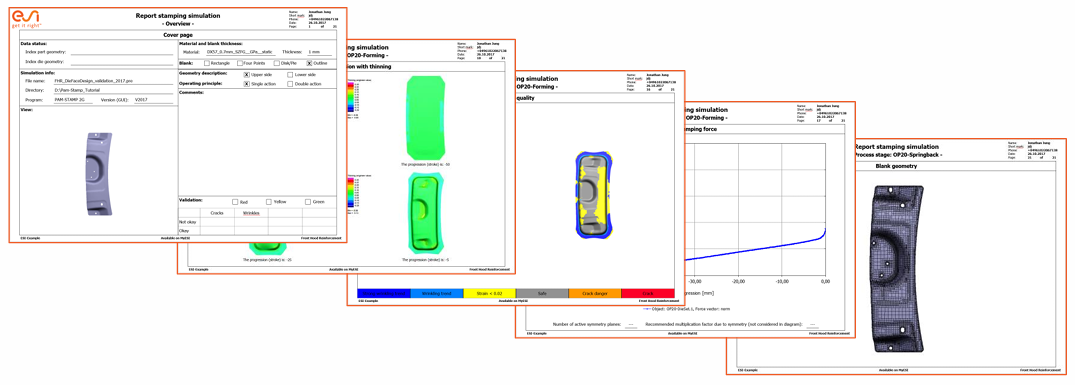
We will be posting some simulation related guidelines for the mechanical engineer students who might be following our websites. Couple of post will be related to PAMSTAMP, then we might proceed to ABAQUS and then ANSYS or other as you demand. This guide is a detailed explanation of the PAM-STAMP Reporting Tool v3.1.5 by ESI Group. Designed as a comprehensive reference for users, it breaks down all features, installation steps, usage guidelines, customization options, and version updates.
1. What is the PAM-STAMP Reporting Tool?
The PAM-STAMP Reporting Tool is a Microsoft PowerPoint add-in designed to automate or semi-automate the creation of project reports for PAM-STAMP simulations. Key features include:
- Seamless integration with PowerPoint
- Automated insertion of graphs, contour plots, and images from PAM-STAMP projects
- Customizable output based on user preferences


2. Installation Steps
To install the Reporting Tool:
- Run the
setup.exefile - Files are installed at:
- Program:
C:\Program Files\ESI Group\ - Add-in:
C:\ProgramData\Microsoft\AddIns
- Program:
- Define system variables:
PAM-STAMP_REPORTINGLANG = EnglishPAM-STAMP_REPORTINGDIR = C:\Program Files\ESI Group\PAM-STAMP_ReportingTool_3.1.5\
- Access via desktop shortcut or Start menu
3. How to Use the Reporting Tool
3.1 Launching
- Access the tool from PowerPoint’s “Add-Ins” tab (Shown in figure below)
- Choose to create a new or continue an existing presentation


3.2 Loading Projects
- Load a project or individual state file
- Read the
.attfile and identify stages - Stages and their types are displayed and can be edited
3.3 Basic Analysis
- Choose layout and activate/deactivate categories
- Analyze categories one-by-one or all together
- PAM-STAMP auto-generates results which are confirmed and added to slides


3.4 All-Stages Analysis
- Analyze selected states across stages
- Configure options like contour value, distance to lower tools
- Textboxes and customized progression can be included


3.5 Special Analysis
- Gravity, Trimming, Springback, and Forming
- Allows multi-angle views and custom result states
- Generate animations and define stamping force or FLC options


3.6 Fast Analysis
- Combine basic, all-stages, and stage-specific analysis
- Run with default settings using minimal user interaction

3.7 Record and Copy Mode
- Record: Logs all user actions
- Copy: Replays recorded analysis on different projects
- Ensures consistency across variant analyses

3.8 Finalizing Presentation
- Finish adds final slides and applies Master Template
- Auto-fills name, info, and branding

4. Customizing the Reporting Tool
4.1 File Structure
- Located in
C:\Program Files\ESI Group\PAM-STAMP_ReportingTool_3.1.5 - Key folders: Configurations, Language_files, Templates

4.2 Language Support
- To add a new language:
- Create language folder in Configurations, Language_files, and Templates
- Translate and duplicate files from existing language folders
- Update system variable:
PAM-STAMP_REPORTINGLANG = <Language>
4.3 Slide Templates
- Add entries in
templates.cfg - Use
_<template-name>suffix for new template CFG files - Customize PowerPoint templates (yellow fields auto-filled)

4.4 Configuration Files
- Customize analysis categories, views, layouts, and PAM-STAMP commands
- Contour presets match analysis types with visuals
DEFAULTS_...andCONTOUR_PROCESSdefine structure
4.5 PAM-STAMP Configuration
- Modify config in PAM-STAMP and save to
Stamp2G_2022.0.cfg - Use thickness factors (e.g.,
<thickness0.8>) for dynamic settings
5. Updates and Changelog
5.1 Version 3.1.5
- Updated for PAM-STAMP 2022.0
- New distance contour and improved FLD coloring
5.2 Earlier Versions
- Enhancements for material and kinematic slides
- Better animation handling
- Support for encrypted material
- Compatibility with 64-bit Office
SEO Tags
#PAMSTAMP #SimulationSoftware #EngineeringTool #ESIGroup #PowerPointAddin #AutomatedReports #3DModeling #SheetMetalForming #TechTools
This SEO-optimized, long-form content can be used as a standalone blog or knowledge base article to inform users and boost organic search rankings.