
Introduction to Alteryx Designer
Hello everyone, it has been a long time since I have decided to write some technical detailed post with my in house commentary. This post will be about Alteryx Designer and how to calculated COGS and Ending Inventory using FIFO (First In First Out) method (with the Alteryx and Power Query Files), I will add LIFO and Weighted Average methods in next post. Some of you might be familiar with Alteryx Designer; here’s the brief intro to the software:
Alteryx Designer is a powerful data analytics tool that allows users to perform data preparation, blending, and analysis through a user-friendly drag-and-drop interface. It enables seamless data integration from multiple sources, including databases and cloud services, without the need for coding. The software supports advanced analytics such as predictive and spatial analysis and integrates with visualization tools like Tableau and Qlik. Users can automate repetitive tasks, enhancing workflow efficiency, and facilitate collaboration by sharing insights and workflo
Data Files for analysis
We will be performing analysis using following data files.
1. Beginning Inventory
This file contains the initial stock at the beginning of the accounting period. It typically includes columns such as:
- ProductID: The unique identifier for each product.
- OnHand: The quantity of each product available at the beginning.
- Price: The cost per unit of each product.
2. Purchases
This file tracks the products purchased during the accounting period. It includes columns like:
- ProductID: The unique identifier for each product.
- Quantity: The number of units purchased.
- PurchasePrice: The cost per unit of the purchased products.
3. Sales
This file records the products sold during the accounting period. It generally includes:
- ProductID: The unique identifier for each product.
- SalesQuantity: The number of units sold.
Data Types in Each File
Beginning Inventory:
| Column | Data Type | Description |
|---|---|---|
| ProductID | Text | Unique identifier for each product |
| OnHand | Integer | Quantity of each product on hand initially |
| Price | Decimal | Cost per unit of each product |
Purchases:
| Column | Data Type | Description |
|---|---|---|
| ProductID | Text | Unique identifier for each product |
| Quantity | Integer | Number of units purchased |
| PurchasePrice | Decimal | Cost per unit of purchased products |
Sales:
| Column | Data Type | Description |
|---|---|---|
| ProductID | Text | Unique identifier for each product |
| SalesQuantity | Integer | Number of units sold |
Overview of Data
The data in these files will be used to calculate the Cost of Goods Sold (COGS) and ending inventory for the accounting period. Here’s how they interact:
- Beginning Inventory: Provides the initial quantities and costs of products available at the start of the period.
- Purchases: Adds to the inventory, increasing the quantity of products available and impacting the average cost in the weighted average method.
- Sales: Reduces the inventory, and helps determine COGS based on the chosen inventory valuation method (FIFO, LIFO, Weighted Average).
By combining and processing these data sets, we can calculate the COGS and the ending inventory value using different inventory valuation methods.
But what is COGS and Ending Inventory?
Cost of Goods Sold (COGS) and Ending Inventory
Cost of Goods Sold (COGS):
- COGS represents the direct costs attributable to the production of the goods sold by a company.
- It includes the cost of the materials and labor directly used to create the good.
- It excludes indirect expenses such as distribution costs and sales force costs.
Ending Inventory:
- Ending Inventory is the value of goods available for sale at the end of the accounting period.
- It represents the cost of inventory that is not sold during the period and is carried forward to the next period.
FIFO, LIFO and Weighted Average Methods
Inventory Valuation Methods
1. FIFO (First-In, First-Out):
- Assumes that the oldest inventory items are sold first.
- Ending inventory consists of the most recently purchased or produced items.
- Commonly used when inventory costs are rising, as it results in lower COGS and higher profits.
2. LIFO (Last-In, First-Out):
- Assumes that the newest inventory items are sold first.
- Ending inventory consists of the oldest inventory items.
- Commonly used when inventory costs are rising, as it results in higher COGS and lower profits.
3. Weighted Average Cost:
- Assumes that all units have the same cost, calculated as the weighted average of the costs of all units available for sale.
- Simplifies inventory management by averaging the cost of all items.
Perpetual vs Periodic Inventory system
Perpetual Inventory System:
- Continuously updates inventory records after each purchase or sale.
- Provides real-time inventory data and helps in better inventory management.
- More expensive and complex to implement due to continuous tracking.
Periodic Inventory System:
- Updates inventory records at the end of the accounting period.
- Simplifies the accounting process but can result in less accurate inventory data during the period.
- Less expensive and easier to implement compared to the perpetual system.
Major differences
Differences Between FIFO, LIFO, and Weighted Average
| Aspect | FIFO | LIFO | Weighted Average |
|---|---|---|---|
| Assumption | Oldest items sold first | Newest items sold first | All items have the same average cost |
| COGS Calculation | Lower during inflation | Higher during inflation | Based on average cost |
| Ending Inventory | Higher value during inflation | Lower value during inflation | Mid-range value |
| Impact on Profits | Higher during inflation | Lower during inflation | Moderate |
| Implementation Complexity | Moderate | Moderate | Simplest |
| Realism | Reflects actual flow of goods in many cases | Less realistic in terms of actual flow of goods | Simplified approach |
| Perpetual System | Requires continuous tracking | Requires continuous tracking | Requires continuous tracking |
| Periodic System | Easier to implement | Easier to implement | Easiest to implement |
| Method | COGS Calculation | Ending Inventory Calculation | Perpetual System Implementation | Periodic System Implementation |
|---|---|---|---|---|
| FIFO | Oldest items sold first | Newest items remain in inventory | Continuous tracking of inventory | Easier to implement |
| LIFO | Newest items sold first | Oldest items remain in inventory | Continuous tracking of inventory | Easier to implement |
| Weighted Average | Average cost of all items available | Weighted average cost of remaining items | Continuous tracking of inventory | Easiest to implement |
How to do FIFO method for COGS and Ending Inventory in Alteryx Designer?
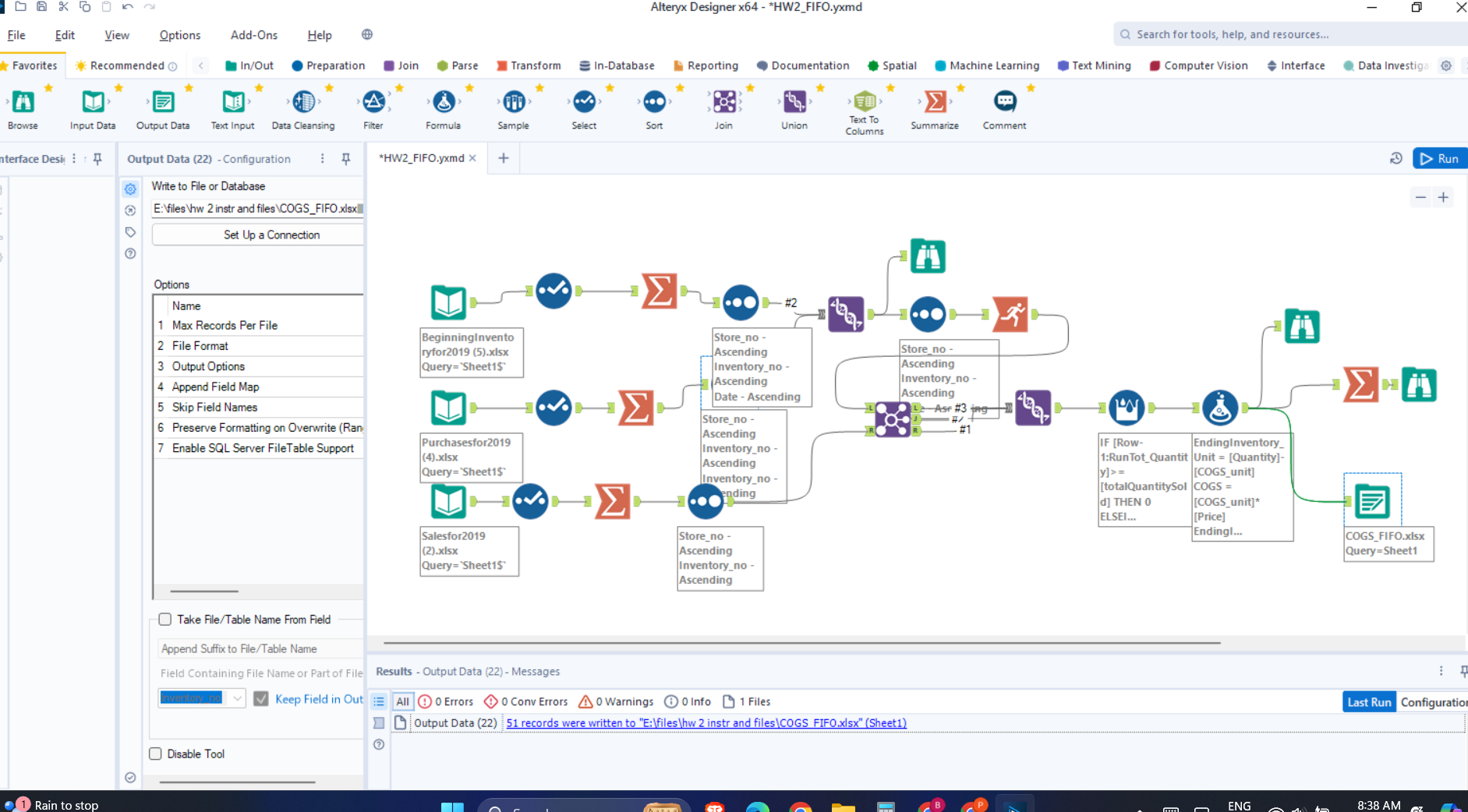
Worry not, I will guide you through the process. But first understand, what is being done in the figure below. This is what your final workflow in Alteryx will look like.

Steps in Alteryx
Steps in Alteryx Workflow
- Read Data:
- Input the
BeginningInventory,Purchases, andSalesdata from the respective files.
- Input the
- Sort Data:
- Sort the beginning inventory and purchases by
ProductIDandDate.
- Sort the beginning inventory and purchases by
- Summarize Data:
- Summarize the total quantities and costs for each product.
- Join Data:
- Join the beginning inventory and purchases on
ProductID. - Join the combined inventory with sales data on
ProductID.
- Join the beginning inventory and purchases on
- Calculate Running Totals:
- Use running totals to keep track of inventory usage.
- Calculate COGS:
- Compute the Cost of Goods Sold using the FIFO method.
- Calculate Ending Inventory:
- Determine the remaining inventory quantities and their costs.
First thing first. load the data.

Then, select the variables and make sure they are as expected (dates should be foratted as dates, and numbers as numbers).

Then the running total.

Join the data.

Use formula in Alteryx to calculate the rest and save file.

FILES (Alteryx Workflow FIFO) that you need!!!!
Above link has files in Excel (Power Query way, I will add how I did this here later) and Alteryx Designer Workflow. Feel free to try and comment if there are any issues. Happy Learning!